
Learn how to capture photos and videos directly on TheMove, keep your hangout moments close, and make your social experiences more memorable.
How to Capture Hangout Memories Directly on TheMove
Some Moments Deserve More Than a Spot in Your Camera Roll
You know that feeling when you're hanging out with your friends, everyone's laughing, someone is telling a story that gets funnier every time they repeat it, and somebody suddenly says, "Wait, let me take a picture!"
Everyone gathers together. Someone makes a funny face. Another person insists on taking five more pictures because they don't like how they look in the first one. Before you know it, you're all laughing again.
Those are the moments you want to remember.
But here's something that happens to a lot of us. You plan an outing, spend hours having fun with your friends, take dozens of pictures, and then return to your regular routine. The photos end up somewhere in your phone's gallery, mixed in with screenshots, downloaded images, receipts, and pictures you barely remember taking.
A few weeks later, you want to look back at that particular game night, birthday dinner, beach trip, or spontaneous weekend hangout. Finding the pictures can become a little adventure of its own.
Wouldn't it be nice if capturing moments could be part of the same experience where you discover and organize your hangouts?
That's where TheMove's in-app camera comes in.
TheMove isn't just about deciding where to go or figuring out what to do with your friends. It also gives you a way to capture photos and videos directly through the app, bringing another part of your social experience into one place.
Let's walk through how you can use this feature and why it can make your next Move even more memorable.
What Is TheMove's In-App Camera Feature?
TheMove's camera feature allows you to capture photos and videos directly inside the app instead of having to leave your social experience to open your phone's regular camera.
Think about it this way: you're out with your friends for a game night. You planned the activity, everyone showed up, and the competition is getting intense. Someone finally wins, and the whole group bursts into laughter.
That's the kind of moment you want to capture while it's happening.
With TheMove's in-app camera, you can open the camera from within the app, capture the moment, and follow the available options to complete the process.
It's a small feature, but it fits naturally into what the app is all about: helping people turn plans into real-life experiences and memories.
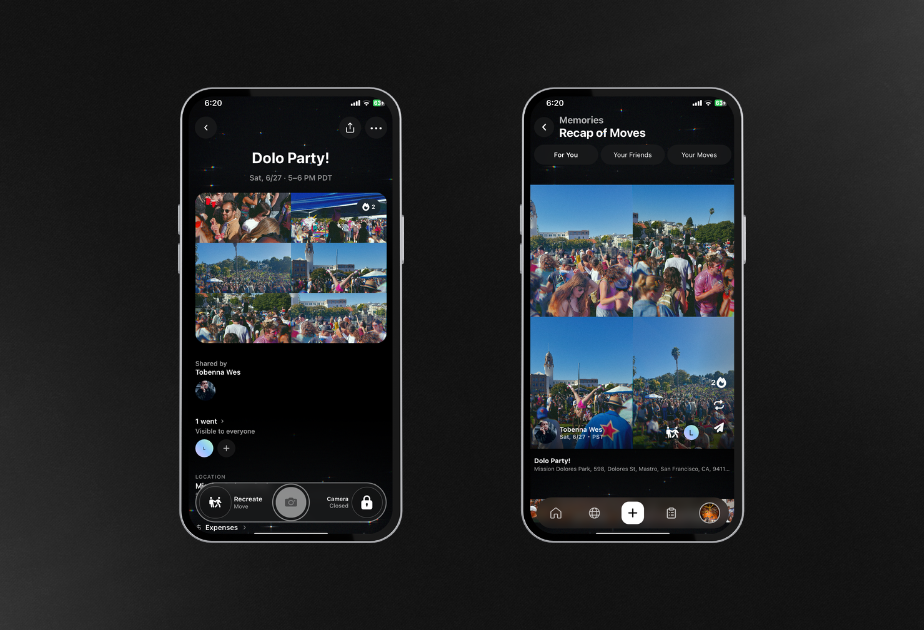
How to Capture Your Hangout Memories Directly on TheMove
You don't need to make capturing memories another complicated task during your outing. Here's how to get started.
Step 1: Open TheMove on Your Phone
Start by opening TheMove on your phone and navigating to the part of the app where you can access its camera feature.
If you're already using TheMove to organize or explore a hangout, you can begin from there. The idea is to capture your experience without having to switch back and forth between multiple apps unnecessarily.
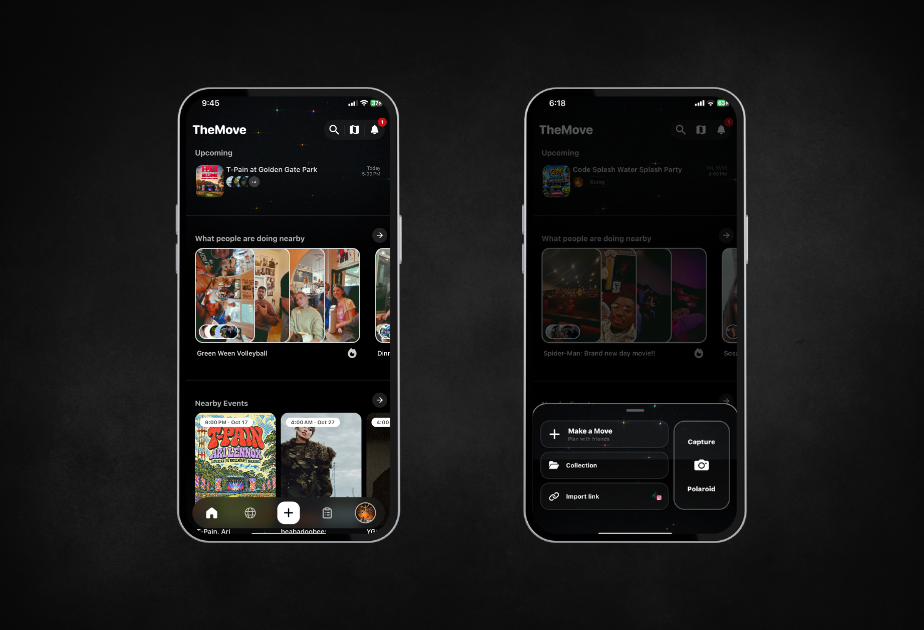
Step 2: Tap the Camera Button
Once you've located the camera button, tap it to open the in-app camera.
Now you're ready to capture what's happening around you.
It could be your friends arriving at a restaurant, the first round of a board game, everyone dancing at a party, or that random moment when the entire group starts laughing for no particular reason.
You don't have to wait for a special occasion. Sometimes, the little moments become the ones you remember most.
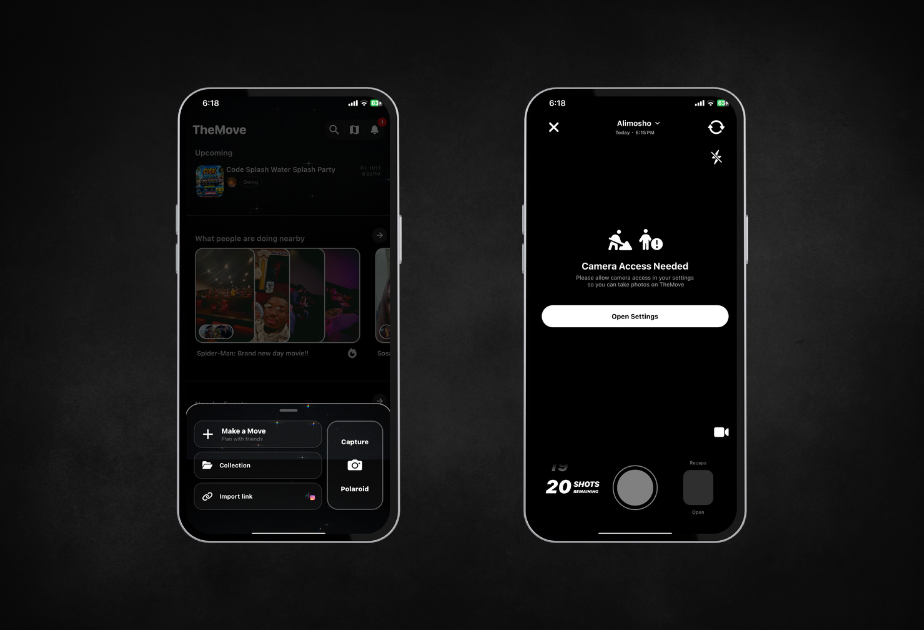
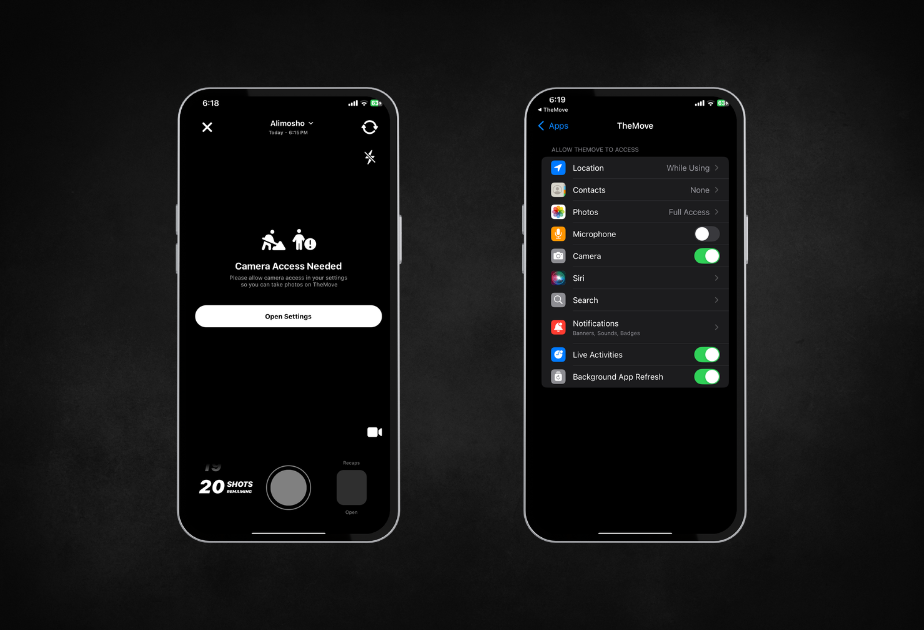
Step 3: Allow Camera Access if Your Phone Requests It
If this is your first time using TheMove's camera, your phone may ask for permission to access the camera.
If you want to take pictures or record videos directly in the app, grant the necessary camera permission when prompted.
Depending on your phone and the permissions requested by the app, you may also encounter a separate request for microphone access when recording video.
If you previously denied access, you may need to open your phone's settings, find TheMove, and adjust the relevant permissions.
Step 4: Capture the Moment
Once the camera opens and the necessary permissions are in place, you're ready to take your picture or record a video using the available camera controls.
Here's where the fun begins.
Imagine that you've organized a birthday dinner with your closest friends. Everyone is finally together, the food has arrived, and you're all trying to get one good group picture before somebody starts eating.
Open TheMove's camera and capture the moment.
Or maybe you're at a game night, and your friend is celebrating a win as if they've just won a world championship. That reaction might be worth recording, too.
The best part about capturing moments as they happen is that you don't have to rely entirely on remembering to take pictures later.
Step 5: Review Your Capture and Follow the Available Options
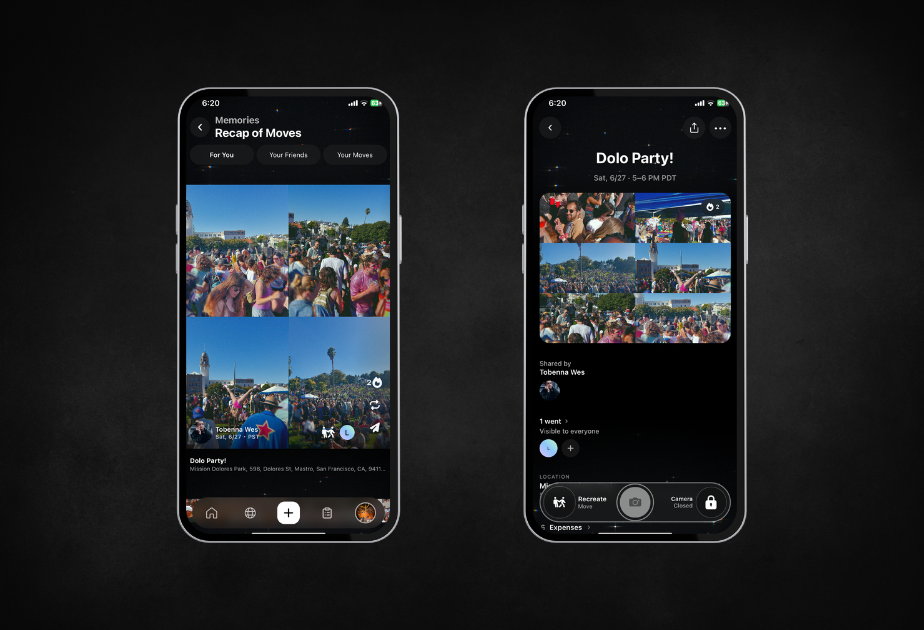
After taking a picture or recording a video, check the options presented by the app.
Depending on the current camera interface, you may have options to review the capture, retake it, or continue with the next available action.
Follow the instructions displayed on your screen to complete the process.
If TheMove presents an option to associate the capture with a Move, follow that option to connect the memory to the relevant experience. If the app presents a different workflow, use the available instructions instead.
The important thing is to understand what happens after capturing the image or video. Taking a photo inside the app does not necessarily mean it has automatically been saved to your phone's gallery or attached to a particular Move.
Five Moments Worth Capturing During Your Next Move
Now that you know the basic idea behind TheMove's camera feature, what should you capture?
Honestly, you don't need to turn every hangout into a photoshoot. You can put your phone away and enjoy yourself, then capture a few moments when something worth remembering happens.
Here are five ideas to try.
1. The Beginning of the Hangout
Remember the excitement when everyone first arrives? Friends greeting each other, people deciding where to sit, and somebody inevitably arriving late?
Those little moments help tell the story of your outing.
Take a picture of everyone settling in or capture a quick video when the group finally comes together.
2. The Activities You Planned
If you've organized a game night, bowling session, picnic, movie outing, or birthday celebration, capture a moment from the activity itself.
Don't focus only on posed pictures. A photograph of everyone concentrating during a game or a short video of your friends celebrating a win can be just as meaningful.
These are the details that help you remember what you actually did, not just where you went.
3. The Unexpected Funny Moments
Let's be honest: the best memories aren't always planned.
Maybe someone makes a joke that gets everyone laughing. Maybe your friend loses a game and immediately demands a rematch. Maybe the group takes a wrong turn and somehow ends up discovering a new favourite spot.
When an appropriate moment presents itself, capture it.
Just remember to respect your friends' comfort and ask before recording or sharing anything they might not want others to see.
4. The Group Picture Everyone Almost Forgot to Take
Someone usually has to remember the group photo. And when nobody remembers, somebody eventually says, "We didn't even take a picture together!"
Make it part of the experience.
Before everyone leaves, gather the group for a quick photo. It doesn't have to be perfect. The important thing is having something that reminds you who was there.
5. The Little Details That Make the Day Special
Sometimes, it's not the people in the picture but the details surrounding them.
It could be the food you shared, the decorations at a birthday dinner, the game you couldn't stop playing, or the beautiful view you discovered during a spontaneous trip.
Capture a few of those details, too. They can help bring the entire experience back when you look at the memories later.
Why Capture Memories Through TheMove Instead of Just Your Regular Camera?
Your phone's regular camera is useful, and there's nothing wrong with using it. TheMove's in-app camera simply offers another way to capture moments while you're already using the app.
Here are a few reasons you might prefer that approach during your next outing.
It Keeps You Closer to Your Hangout Experience
When you're using TheMove to organize and explore social activities, being able to open the camera from within the app adds another convenient option to your experience.
You don't have to think of capturing memories as something completely separate from planning the outing.
It Makes Capturing Moments Feel More Natural
Sometimes, the hardest part of taking pictures is remembering to do it.
When the camera is accessible within an app you're already using for your social plans, it can be easier to remember to capture a moment when it happens.
Of course, you don't need to document everything. Enjoying the moment matters just as much as recording it.
It Complements the Way You Plan Hangouts
A Move is more than a date and a location. It's an experience you share with other people.
TheMove brings social planning and real-world experiences together, and its camera feature adds another way to capture those experiences along the way.
For someone who enjoys organizing activities with friends, that's a useful addition to the overall experience.
It Encourages You to Be Intentional About Your Memories
Instead of taking dozens of random pictures that you never revisit, you can be more deliberate about capturing the moments that matter during your outings.
Take a photo when the group arrives. Capture the highlight of the activity. Get one good picture before everyone leaves.
A few meaningful moments can tell a better story than a hundred pictures taken without thinking.
A Few Things to Remember When Using TheMove's Camera
Before your next hangout, keep these simple tips in mind.
- Check your camera permissions. If the camera doesn't open, confirm that TheMove has the necessary permissions in your phone's settings.
- Make sure you have enough battery. Recording videos and taking pictures can use additional battery power, especially during long outings.
- Pay attention to lighting. If you're indoors, try to capture moments in a well-lit area so your pictures are clearer.
- Ask before recording others. Make sure your friends are comfortable being photographed or recorded, especially if you intend to share the content.
- Check what happens after capture. Follow the in-app instructions and don't assume every picture or video is automatically saved to your phone or attached to a Move.
- Stay present, too. You don't have to record every second. Sometimes, the best part of a hangout is simply enjoying it with the people around you.
Frequently Asked Questions About Capturing Memories on TheMove
Can I take pictures directly inside TheMove?
Yes. TheMove's in-app camera supports capturing photos and videos directly within the app. Open the camera feature and follow the controls displayed on your screen.
Do I need to leave TheMove to use the camera?
No. The purpose of the in-app camera is to let you capture photos and videos from within TheMove rather than having to open your phone's regular camera separately.
Can I record videos as well as take pictures?
Yes. TheMove's camera feature supports both photo and video capture. The available controls may depend on the version of the app you're using.
Are my pictures automatically saved to my phone's gallery?
Don't assume so. Capturing content inside an app and saving it to your phone's gallery are not necessarily the same thing. Check the options displayed by TheMove after capturing your photo or video.
Can I use the camera during different types of hangouts?
You can use the camera to capture suitable moments during activities such as dinners, game nights, picnics, birthday celebrations, and other outings. Always check the app's available controls and respect other people's privacy when recording.
Your Next Hangout Could Be Your Next Favourite Memory
Think about the last time you had a really good day with your friends.
Maybe it was a simple dinner that turned into hours of conversation. Maybe it was a game night that got a little too competitive. Or maybe it was one of those spontaneous outings that nobody planned properly but everyone ended up enjoying.
Those are the moments worth remembering.
With TheMove, you can discover and plan experiences with your friends and use the in-app camera to capture photos and videos along the way.
So, the next time you're getting ready for a hangout, don't just think about where you're going or what you're going to do. Think about the moments you'll want to look back on afterwards, too.
Open TheMove, explore your next Move, and when a moment worth remembering happens, capture it.
Your plans brought you together. The memories make it worth looking back.
Ready to plan your next hangout? Check out our guide to planning the perfect hangout with TheMove and start thinking about your next Move.