

Learn how to create a hangout budget on TheMove, split expenses equally or customize each person's contribution, and keep your group organized.
Planning a hangout with friends is exciting. Figuring out who pays for what? Not always.
Whether you're organizing a birthday dinner, a weekend trip, a game night, or a group outing, money can quickly become the most complicated part of the plan. Someone creates a budget, another person asks how much they should contribute, and before you know it, the group chat is full of calculations.
TheMove makes this easier with its expense-splitting feature. You can create a budget for your hangout, add the friends participating, and decide how much each person should contribute. Split the cost equally or customize each person's contribution to suit your plan.
Here's how to split expenses on TheMove, step by step.
What Is TheMove's Expense-Splitting Feature?
TheMove's expense-splitting feature helps you organize the budget for a hangout and share each participant's expected contribution in one place.
Instead of calculating everyone's share separately or sending multiple messages to explain the budget, you can add your expenses, choose who is participating, and decide how to divide the cost.
You have two options:
- Split equally: Divide the total budget equally among everyone participating.
- Custom split: Enter the specific amount you want each participant to contribute.
Once you send the expense details, participants receive a notification with their share. They can then use the Move's group chat to discuss the plan and coordinate the details.
How to Split Expenses on TheMove
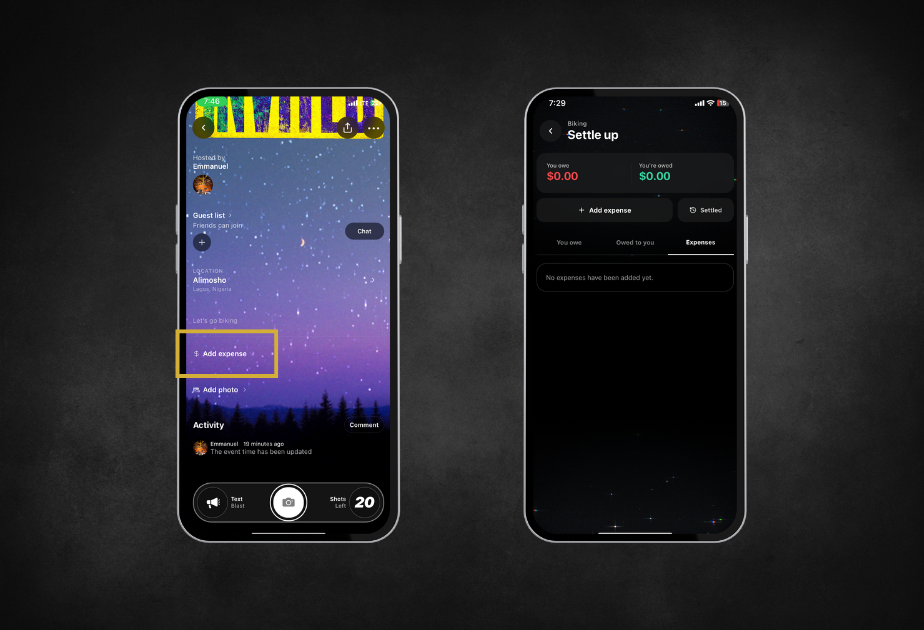
Step 1: Open Expenses and Add an Expense
Open TheMove and navigate to the Move you're planning. Select Expenses, then tap Add Expenses to begin creating your budget.
This is where you can start organizing the cost of your upcoming hangout, trip, dinner, or other group activity.
Step 2: Enter Your Budget and Add Friends
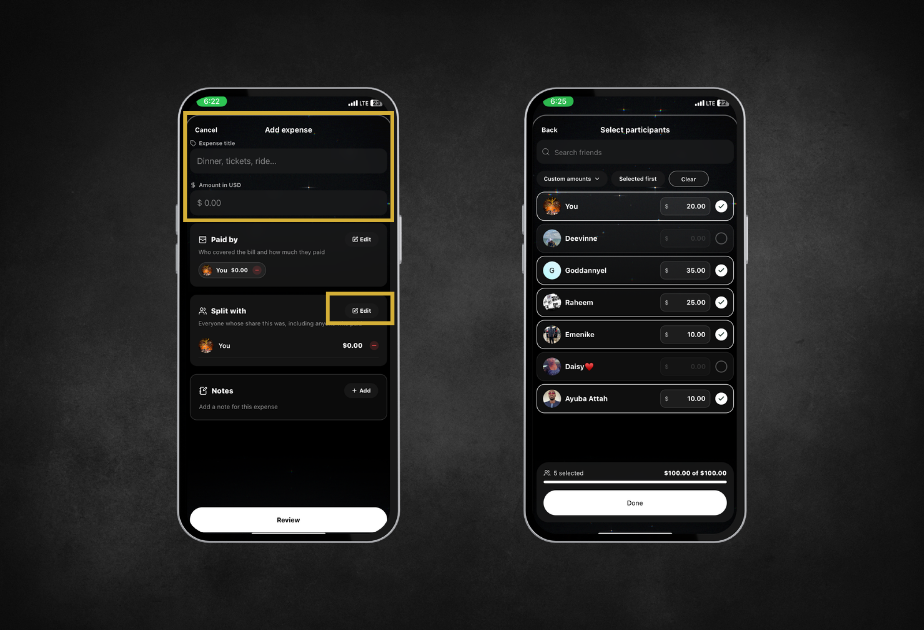
Enter the total budget you want to plan for the activity. Next, add the friends or participants who will share the expenses.
For example, imagine you're planning a group hangout with a total budget of ₦100,000 and five participants.
Once you've entered the budget and selected the people involved, you're ready to decide how the cost should be divided.
Step 3: Choose How to Split the Expense
TheMove gives you the flexibility to divide the budget in a way that works for your group.
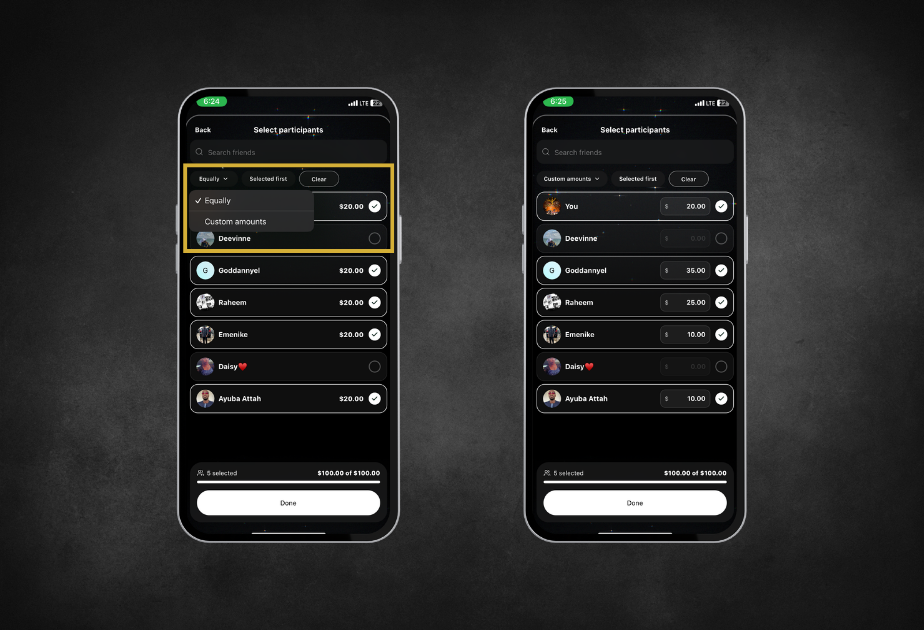
Option A: Split equally
Choose the equal-split option if everyone is expected to contribute the same amount.
For example, if five people are sharing a $100 budget, each person contributes $20.
This option works well for shared activities where everyone has agreed to contribute equally.
Option B: Use a custom split
Not every group expense needs to be divided equally. Sometimes, one person wants to contribute more than another, or everyone has agreed on different amounts.
With the custom-split option, you can enter the specific contribution amount for each participant.
For example, one person might contribute $30, another $25, and the remaining participants can contribute amounts that cover the rest of the budget.
Make sure the contributions add up to the total budget you've set.
Step 4: Send the Expense Details to Participants
Once you've reviewed the budget and everyone's contribution, send the expense details through TheMove.
Participants will receive notifications showing their assigned contributions, so everyone can see what they're expected to contribute without having to ask for their share individually.
This makes it easier for everyone to understand the budget before the hangout takes place.
Step 5: Continue Planning in Your Group Chat
The budget is only one part of a successful hangout. You still need to agree on the location, timing, activities, and other details.
With TheMove, participants can head to the Move's group chat to discuss the plan and coordinate with one another.
Instead of having the budget in one conversation and the actual plans scattered across several messages, your group can keep the planning connected to the Move.
If you haven't created your event yet, read our guide on how to create a Move or event on TheMove before setting up your hangout budget.
When Should You Use TheMove's Expense-Splitting Feature?
You can use expense splitting for almost any group activity that requires a shared budget.
Here are a few examples:
- Birthday celebrations: Plan the budget for food, decorations, venue costs, and other shared expenses.
- Weekend trips: Organize contributions toward accommodation, transportation, and group activities.
- Dinner with friends: Decide how much everyone will contribute before heading out.
- Game nights and picnics: Set a budget for snacks, drinks, supplies, and other essentials.
- Group outings: Keep everyone's expected contribution clear before the activity begins.
Whether your group is planning something simple or organizing a bigger outing, having a clear budget helps everyone prepare.
Make Group Planning Easier With TheMove
A great hangout shouldn't become stressful because nobody knows how much to contribute.
With TheMove's expense-splitting feature, you can set a budget, add participants, choose an equal or custom split, and notify everyone of their share. Your group can then continue the conversation and coordinate the rest of the plan in one connected space.
TheMove isn't just about discovering activities or connecting with friends. It's also about making it easier to turn an idea into a plan everyone can participate in.
Ready to plan your next hangout? Open TheMove, create your next Move, and use the expense-splitting feature to get your group organized.
Found your next move? Take it with you on TheMove.